
Does ConvertKit have a 2026 Black Friday sale?
Written by Jessica Freeman, Web Designer and SEO Strategist since 2011 • Post Last Updated November 2026
I’ve been using ConvertKit [Kit] for almost 10 years now, to run all of my email marketing, including onboarding into my virtual community. It’s one of the few email tools that I recommend, after working inside several others! In this post, I’m going to share who it’s right for, who should skip it, and whether or not the Black Friday deal is worth it for you.
All of the email marketing tools (Kit, MailerLite, Flodesk) are good at selling you features that you may not even use. So, I really recommend that you use a platform that makes email feel easier for you!
Heads up: I use affiliate links for tools I use and trust. If you buy through my links, I may earn a small commission at no extra cost to you.
What is (Convert)Kit?
Kit, formerly known as ConvertKit, is an email marketing platform built for small business owners and online creators. It offers newsletters (broadcasts), automations and workflows, as well as forms and even selling digital products.
On their paid plans, you can get unlimited visual automations, as well as be in their Recommendations network for list growth. They have an easy tags and segments feature, so you can target your list better and follow-up with warmer leads!
What’s included in Kit’s plans?
Kit has a free plan if you’re just getting started, that supports up to 10,000 subscribers! One of the greatest free plans out there. It does limit you to only one email sequence though.
Kit’s Creator and Pro plans are more robust:
- Visual automations (my favorite!)
- Tags and segments
- Forms, pop-ups, and landing pages
- Selling products
- Recommendation network
- Kit MCP
- RSS campaigns
- SMS marketing
- Easy polls in your emails
Pro also comes with Subscriber Signals and access to the Growth Concierge team!
What I actually use: I’m on the Creator plan, and I use the automations, tags, and of course the forms. I occasionally use it to sell products, but not often (though it is super easy to setup!)
I don’t really the SMS marketing or RSS campaigns.
Deep dive: Kit automations
Like I mentioned above, automations are one of the big things I use inside Kit. I like to keep my subscribers engaged, so they are always getting added to a nurture sequence or something, it’s not just “join my list and get 3 emails.”
Here’s a screenshot of one of my automations for The Ordinary Business.
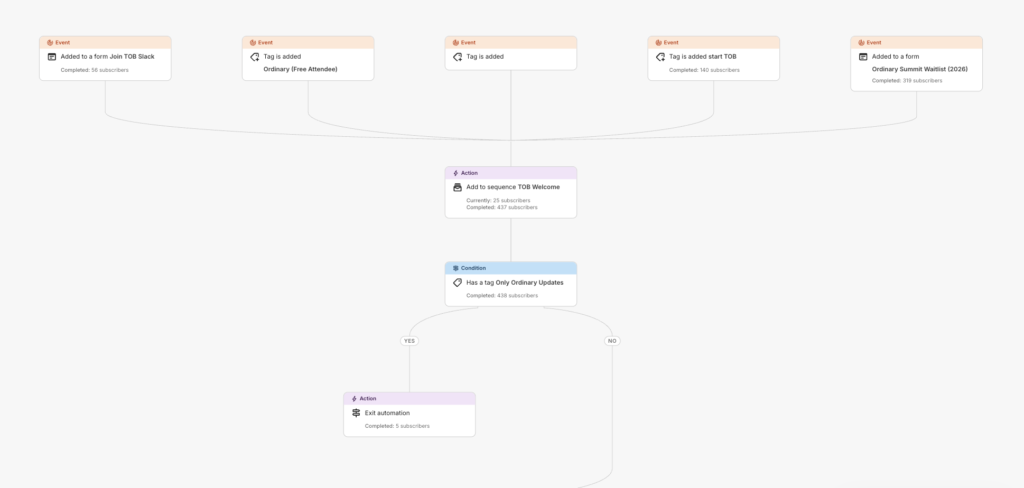
The automations from top to bottom, and I have it broken into a few parts:
First, the triggers. There are a few ways for someone can enter (just as a fail-safe, to make sure people get in the sequence). All the entry points lead to the same place, so it’s just one welcome sequence. I love that the automations let us have multiple entry points.
Second, the welcome. Again, everyone lands in the same welcome sequence that I setup.
Third, the sorting. You can also setup conditions in your automations and sequences. So, if a person has a certain tag, they exit the automation. If there’s no tag, then they get rolled into another sequence, and get the next set of emails.
Basically, I’m honoring their request to only send certain emails!
The visual builder for automations is easy to read and setup, but it’s also very easy to have a page that looks like spaghetti after awhile. Try to really focus on setting up your tags and automations clearly (and naming them very clearly) from the get-go.
Kit Pricing and 2026 Black Friday Deal
| Plan | Annual | Monthly |
| Newsletter (free) | $0 | $0 |
| Creator | $390/year | $33/mo (starts at) |
| Pro | $790/yr | $50/mo (for Black Friday) |
The way Kit does their pricing, your cost will go up based on your subscriber count. So, if you’re on Creator and have $1,000 subscribers, it’s $39/mo. But, once you reach 3,000 subscribers, it jumps up to $50/mo.
With their Black Friday deal, you can save an extra 10% off your first year of the Pro plan!
Who Kit is for (and not)
I think Kit is best for experienced solopreneurs and service providers with lots of automations and segmenting. It’s also good for creators who are selling digital products, a course, or membership.
I don’t think Kit is a great fit for hobbyists or businesses that need more advanced e-commerce or CRM features that might come from something like Klaviyo or Hubspot.
| Pros of Kit | Cons of Kit |
| Free plan that works while you get started | Price increases as your list rows |
| Unlimited tags and segmenting options | Email design template limits |
| Recommendation network for visibility | Recommendation Network can be spammy |
| Lots of integrations and apps available | No date-specific sequence options |
Alternatives to Kit
- MailerLite: This is a great option for those who are newer in business and need a more budget-friendly option that still has good features
- Flodesk: This is a great option for business owners who really want to focus on ‘pretty’ emails and also don’t want to pay more based on their number of subscribers.
- Klaviyo: This is the tool to use if you are an e-commerce business!
Is Kit right for you?
They offer free migrations, so if you’re looking for more automations and more data insights, I think you should move to Kit! The best email platform is the one you’ll actually open and use. If that seems like Kit, grab the Black Friday deal here.
