
Website Redesign Tips from a Designer: Everything You Need to Know Before You Start
Written by Jessica Freeman, Web Designer and SEO Strategist since 2011 • Post Last Updated September 2026
A website redesign pays off when your current site is slow, hard to use on a phone, invisible in search, or describes a business you no longer run. This guide covers how to tell if you’re there, the seven steps of a redesign, the questions to answer before you start, and what a redesign costs. I’ve built sites for 400+ clients since 2011, mostly health and wellness practitioners, so the examples lean that way. Grab a coffee (or a Diet Dr Pepper, like me) and get comfy.
When is it time to redesign your website?
It’s time when one or more of the following is true, and each one should be checked against your data instead of a gut feeling.
- Your site looks dated or is hard to use. If it looks like it was built when flip phones were cool, visitors read that as a signal about your business. Ask three people who have never seen it to find your services page or booking link. If they hesitate, your navigation is the problem.
- It’s slow. Run your homepage through Google’s PageSpeed Insights. Google’s Core Web Vitals targets are a Largest Contentful Paint of 2.5 seconds or less, an Interaction to Next Paint of 200 milliseconds or less, and a Cumulative Layout Shift of 0.1 or less. A heavy theme or oversized images are common causes, and those are build problems that a settings tweak won’t fix.
- It falls apart on phones. Google indexes the mobile version of your site, so a broken phone layout hurts your rankings as well as your visitors. Check the device report in Google Analytics 4 to see how much of your traffic comes from phones, then load your own site on one.
- Google can’t find you. Open Search Console and look at impressions over the past 12 months. Flat or falling impressions with no obvious cause point to a structure or SEO problem.
- Your business changed and your site didn’t. If your services, pricing, or ideal client shifted, the site should say so. Your website is supposed to sell for you, and right now it may be the relative who tells outdated stories at family gatherings.
- People leave without acting. Compare your engagement rate and your form submissions or booking clicks to your own numbers from a year ago. Industry benchmarks vary too much to help; your own trend is the one that counts.
If you’re nodding along to any (or heaven forbid, all) of these points, congratulations! You’re a prime candidate for a website redesign. Why not take the first step today? Click here to learn more about working with me.
An Overview of The Website Redesign Process
A website redesign has seven steps: assess the current site, set goals, research, choose a designer, plan SEO and content, build and test, then launch and monitor.
Step 1: Assess Your Current Website
Record your baseline before you change anything. From Google Analytics 4, pull organic sessions, top landing pages, and conversion rate for the last 12 months. From Search Console, export impressions, clicks, and top queries. From PageSpeed Insights, save your Core Web Vitals for the homepage and your three most visited pages. Then crawl the site with Screaming Frog (the free version covers up to 500 URLs) to get a full list of pages, broken links, and missing page titles. Without this baseline you can’t prove the redesign worked, and at 90 days you’ll have nothing to compare against.
Step 2: Set Goals and Pick Your Metrics
Choose one primary goal and one or two supporting metrics, each with a number and a deadline. “More leads” can’t be hit or missed. “Grow booked consultation calls from 6 to 12 a month within six months of launch” can. For a sense of what’s possible, Ruby Oak Nutrition went from 3,000 to 15,000 monthly visits after their redesign. Write your goals down and share them with your designer, because every design decision should trace back to one of them. Track them in GA4 and Search Console so the before and after comparison takes minutes.
Step 3: Research Competitors and Your Own Clients
Look at how three to five competitors structure their sites: which pages they have, how they describe their services, and what their calls to action say. Then look at your own data, which is more useful. Search Console shows what people already type to find you, and your intake forms, discovery call notes, and inbox show what they ask before booking. Those questions should shape your page headings and FAQs. By the end of this step you should be able to describe the look, the page list, and the tone you want in a few sentences.
Step 4: Choose a Web Designer
Hire someone who has built sites in your industry and can show you results, since a designer who knows how practitioners get booked will make different decisions than one who doesn’t. You wouldn’t hire a submarine designer to build a treehouse. Before you sign, get these in writing: page count, who writes the copy, how many revision rounds are included, which platform the site will use, who owns the domain and hosting, and whether SEO and redirects are in the scope. On platforms, I build on WordPress (Kadence or Divi), Squarespace, and Showit. WordPress gives you the most flexibility and needs the most maintenance. Squarespace is the easiest to edit yourself. Showit gives you the most design freedom and takes extra care to get SEO structure right.
Step 5: Plan SEO and Content
Plan SEO before design starts, because it decides your page structure. Use keyword research to give each page one main topic, plan your URLs and headings, and decide how pages link to each other. Then audit your existing content and sort every page into keep, rewrite, merge, or delete. Build a spreadsheet that maps each old URL to its new home, since you’ll need it for redirects at launch. Migrations are where SEO gets won or lost: after The Sleepyhead Coach moved from Wix to WordPress, the site gained 2,000+ keywords. Your site should also be easier to get around than your grandma’s photo albums, and that starts with this content map.
Step 6: Design, Build, and Test
Build on a staging site (a private copy of your site) with search engine indexing turned off, so Google doesn’t crawl the unfinished version. Test on at least one iPhone, one Android phone, and a desktop browser you don’t normally use. Submit every form and confirm the notification lands in your inbox, and click every button. Run PageSpeed Insights on the staging pages and fix anything that misses the Core Web Vitals targets before launch. Check that images have alt text and that text has enough contrast against its background, since both help accessibility and search. Then ask five people who have never seen the site to complete one task, like booking a call; five testers will surface most of your usability problems.
Step 7: Launch and Monitor
Launch day feels a little like dropping a kid at college, so back up the old site first. Confirm that a 301 redirect sends every old URL to its closest new page, that GA4 tracking fires on the new site, and that the noindex setting is off. Submit the new sitemap in Search Console. After launch, watch the Pages report in Search Console for indexing errors and check for 404s. Rankings often shift for a few weeks after a redesign, so compare against your Step 1 baseline at 30, 60, and 90 days instead of reacting to day-three numbers. A redesign doesn’t end at launch, so schedule a monthly check on speed, traffic, and conversions.
Questions to ask before redesigning your website
Answer these before you hire anyone. They decide the scope, the budget, and how you’ll judge the result.
What are my business goals for a website redesign?
Name the business outcome first, such as more booked consults, more newsletter sign-ups, or fewer unqualified inquiries, then judge every feature against it. If you can’t explain how a feature supports the goal, cut it.
How will a redesign improve user experience?
Every page should make the next step obvious. Check that a booking or contact option is visible without scrolling, that the site works on a phone, and that a first-time visitor can find your services quickly. Think about what your visitors are trying to do, and remove whatever gets in the way.
Do I need new website content, or can I reuse what I have?
Audit first. Pages that get traffic or convert usually need editing, not replacing. Pages with no traffic, outdated information, or overlapping topics get merged or deleted. New copy takes real time to write, so build it into your timeline instead of expecting it to appear the week before launch.
How will a redesign improve my SEO?
It improves SEO only if SEO is planned: faster pages, a clean structure, one topic per page, and redirects from every old URL. A redesign without that planning can lower your rankings.
What is a realistic budget and timeline for a redesign?
See the tables below. If someone quotes you a complete redesign for the price of a nice dinner and promises it by next week, walk away.
Which platform should I use?
Stay if your current platform supports your goals, and move if it doesn’t. The Sleepyhead Coach’s move from Wix to WordPress is one example of a switch that paid off. Choose based on who will edit the site day to day and what features you need, because the platform is the foundation of everything else.
How will I measure success after the redesign?
Pick your KPIs before design starts: organic sessions, conversion rate, page speed, and ranking keywords are the usual ones. Compare them to your Step 1 baseline at 30, 60, and 90 days.
How much does a website redesign cost?
Ranges for a professionally built redesign:
| Business size | Pages | Budget | Best for |
|---|---|---|---|
| Solopreneur / micro business | 1-5 | $5,000-$15,000 | Basic “who we are and what we do” sites |
| Small business | 5-15 | $15,000-$30,000 | More room to show products or services |
| Medium business | 15+ | $30,000-$50,000 | A lot to say and sell |
| Project type | Pages | Timeline | Best for |
|---|---|---|---|
| Quick refresh | 1-8 | 2-3 weeks | A new look, fast |
| Standard small business redesign | 8-20 | 4-8 weeks | Most small business sites |
| Complex redesign | 20+ | 8-12 weeks | More pages, more features |
Page count sets the baseline, and four things push the price up: whether copy is included, migrating a blog, integrations like booking or memberships, and the number of URLs that need redirects.
What are the most common website redesign mistakes?
Redesigning without clear goals. With no destination, you can’t tell whether you arrived. Write your Step 2 goals before you talk to a designer.
Adding every feature. Each extra feature adds load time and buries your booking button. If a feature doesn’t tie to a goal, leave it out.
Treating mobile as an afterthought. Google indexes the mobile version, so design the phone layout first and check your GA4 device split to see how many visitors it affects.
Skipping usability testing. Five people trying to book a call will show you problems you stopped seeing months ago.
Bolting SEO on at the end. Page titles, URL structure, and redirects all get decided during planning.
Real-World Website Redesign Success Stories
Still not convinced? Let’s take a quick look at some businesses that knocked it out of the park with their redesigns:
- Revamping the Periodontal & Implant Specialists of Beverly Hills’ Website
- The Sleepyhead Coach Gains 2,000+ Keywords and More Sales: A Wix to WordPress Success Story
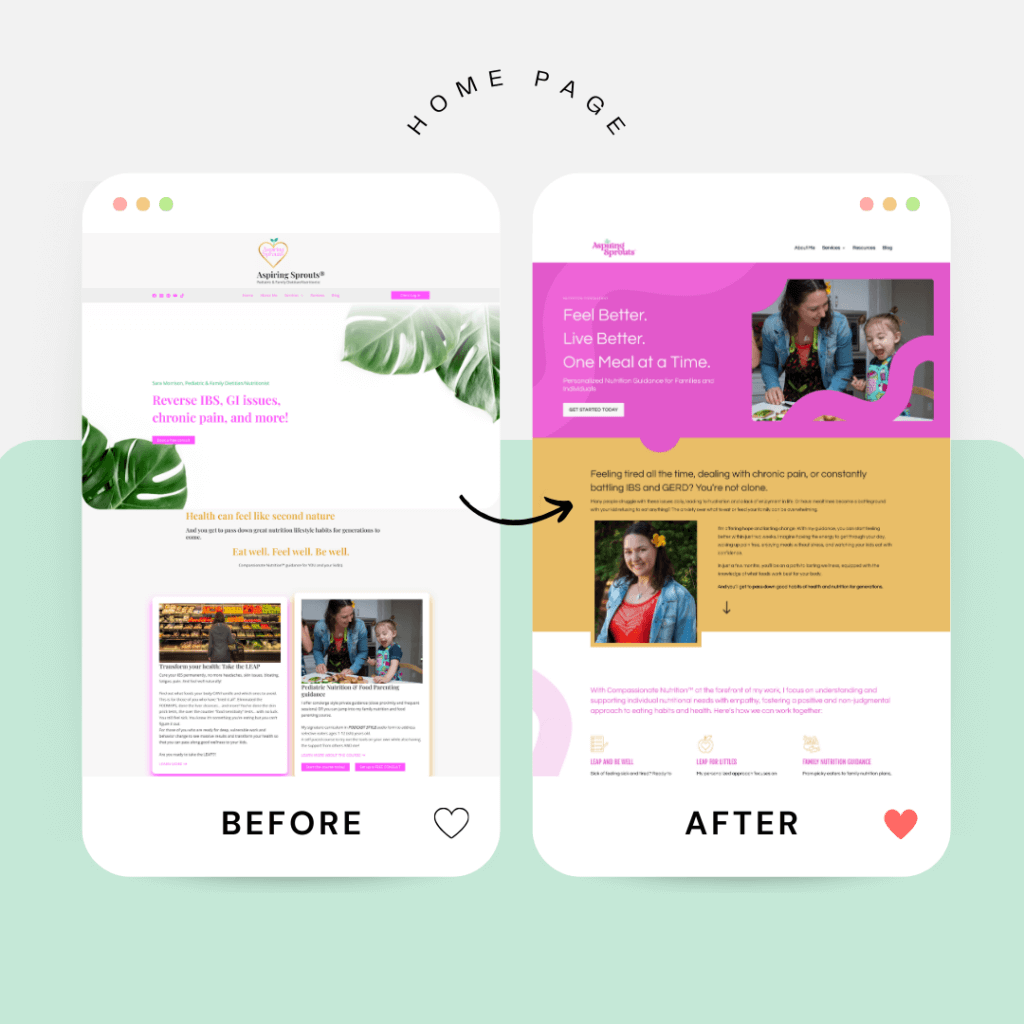
- Ruby Oak Nutrition 5X’s Traffic: From 3,000 to 15,000 Monthly Visits After a Website Redesign
Last Thoughts About A Website Redesign
Remember, a great website redesign isn’t just about making things look pretty (though that’s certainly a perk). It’s about creating an asset that works for your business, day in and day out. That means setting clear goals, asking the tough questions, and yes, sometimes making difficult decisions.
Keep your users front and center in everything you do. After all, they’re the ones who’ll be navigating your digital masterpiece. And don’t forget about our friend SEO – because what’s the point of a beautiful website if it’s buried on page 37 of Google?
Now, I know what you’re thinking. “This sounds like a lot of work.” And you’re right, it is. But here’s the kicker: it’s worth it. A well-executed redesign can be the difference between a website that’s just taking up space on the internet and one that’s actively growing your business.
Why not take the first step today? Click here to learn more about working with me.
