
My Favorite Keyword Research Tool (Ahrefs) for Business Owners
Written by Jessica Freeman, Web Designer and SEO Strategist since 2011 • Post Last Updated October 2026
Ahrefs’ free Keyword Generator is the free keyword research tool I recommend first. Type in a keyword and it shows a difficulty label (easy, medium, or hard) and a monthly search volume range, with no account and no daily search limit. You won’t get exact numbers, but you’ll get enough to tell which keywords deserve a page on your site and which ones to walk away from.
Why does keyword research matter for SEO?
Keywords are the words and phrases people type into Google when they’re looking for something, and keyword research shows you which ones your future customers actually use. The gap between your wording and theirs can be big.
A dietitian might describe her work as “medical nutrition therapy” while the people who need her are searching “dietitian for IBS,” and if her website only uses the first phrase, it won’t show up for the second. Matching your language to theirs is how a page ranks higher in search results and brings in organic traffic without ad spend.
What do you get with Ahrefs’ free keyword generator?
The free version gives you three things:
- No account and no daily limit. You can run as many searches as you want, which most free keyword tools won’t let you do.
- A keyword difficulty label. Every keyword is rated easy, medium, or hard, based on how many other websites are competing for the same term.
- A search volume range. You see a bracket like “over 1,000” or “greater than 10,000” instead of an exact number.
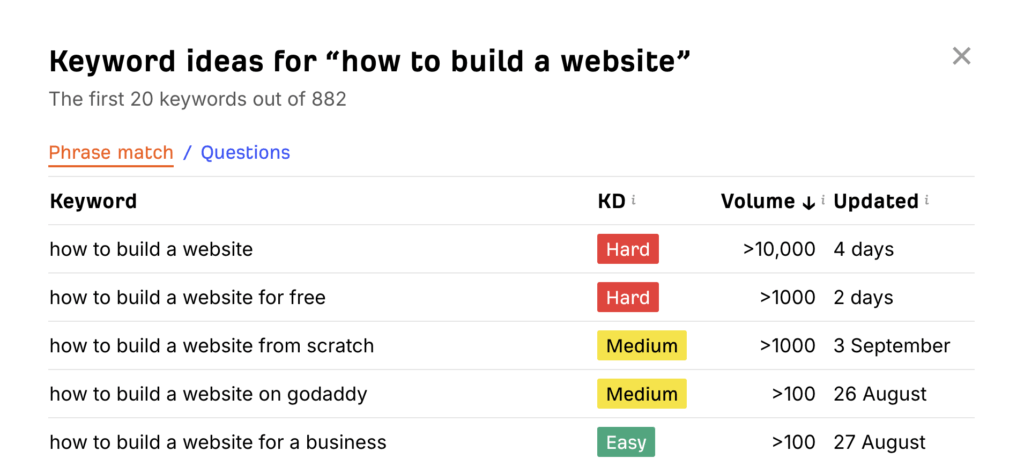
When I searched “how to build a website,” the tool showed a hard difficulty rating and more than 10,000 monthly searches. It couldn’t tell me how much more than 10,000.
How does the free version compare to paid Ahrefs?
Here’s the same keyword, “how to build a website,” in both versions:
| Feature | Free Keyword Generator | Paid Ahrefs |
|---|---|---|
| Account required | No | Yes |
| Keyword difficulty | Label: easy, medium, or hard | Exact score out of 100 (96 for this keyword) |
| Search volume | Range, such as “greater than 10,000” | Exact monthly number (11,000 for this keyword) |
| Last-updated date for the data | Not shown | Shown, so you can watch trends over time |
| Related keywords and backlink analysis | Not included | Included |
A difficulty score of 96 out of 100 means that keyword is extremely competitive, which the free version’s “hard” label tells you too, just with less precision. If you’re not ready for a monthly subscription, the free version does the job for picking topics. The paid version starts earning its price when you need exact numbers to choose between keywords that look similar.
How do you use the free keyword generator?
- Type in a keyword related to your business. If you’re a business coach, try “business coach.”
- Read the difficulty and volume. “Business coach” came back as hard with over 1,000 searches a month. I don’t get the exact figure, but that’s plenty of interest to know people are looking.
- Hunt for easier keywords with real volume. “How to become a business coach” came back as easy, with fewer than 100 searches a month. A newer site has a much better shot at ranking for terms like that, and those rankings are what build momentum for the harder keywords later.
How many monthly searches should a keyword have?
Aim for at least 100 to 500 monthly searches if you’re putting real time into a piece of content. Go lower if your market is niche, because 50 searches a month from exactly the right people is worth more than 5,000 from people who will never hire you. Then check the difficulty: a high-volume keyword that’s also hard is a long shot for a newer site, while a lower-volume easy keyword is a page you can rank for.
Is the free version of Ahrefs enough to get started?
For choosing blog topics and page keywords, yes. The difficulty labels and volume ranges are enough to decide what to write next, and I’d start free and see whether you ever miss the exact numbers.
