
Do Google Reviews Help SEO for Private Practices?
Written by Jessica Freeman, Web Designer and SEO Strategist since 2011 • Post Last Updated October 2026
Google reviews help you show up in the Local Map Pack, and Google doesn’t list them as a ranking factor for your website’s organic listings. According to Search Engine Journal, review signals make up roughly 17% of what determines Map Pack rankings, compared to about 5% for the organic results below it. Those percentages come from industry surveys, not from Google, so treat them as a rough gauge. They still point to where reviews pay off, which is the three-pack most patients click first.
Do Google reviews affect my Google Business Profile ranking?
Yes. Google evaluates local rankings on relevance, distance, and prominence, and reviews are one of the biggest levers inside prominence. Star rating carries real weight, with practices rated 4.0 to 5.0 scoring highest on prominence signals, and the language inside the review text matters almost as much as the number itself.
How often reviews come in counts, too. A steady trickle of new reviews tells Google your practice is active. A profile with 40 reviews from three years ago looks different from one with 40 reviews and five new ones this month, even though the totals match.
Google also says prominence reflects what it knows about you from across the web, like links, articles, and directories, so reviews are one input among several. They’re the one you have the most control over.
Do Google reviews help my website rank in regular search results?
Google hasn’t named reviews as a ranking factor for your website’s organic listings, and I wouldn’t build a strategy around the idea that they are one. You’ll read that reviews help indirectly, through more clicks, more searches for your practice name, and better engagement. Those benefits are plausible, but Google hasn’t confirmed them, and nobody outside Google can tell you how much they matter.
What you can count on is the Google Business Profile effect above. Treat anything beyond that as a bonus for your website!
Do star ratings change which practice patients choose?
Yes! In the Map Pack, your star rating and review count sit right next to your name, so a patient comparing three practices sees 4.9 stars with 80 reviews beside 4.1 stars with 6 reviews and makes a quick call.
Ranking gets you into the three map pack. It’s your reviews that help decide which business of the three gets the phone call.
How many Google reviews does a private practice need?
There’s no magic number. The target is to match or beat the practices already showing in the Map Pack for your main search. Search the way a patient would, like “pediatric dietitian near me” or “pelvic floor physical therapist Atlanta,” look at the three practices that show up, and note their review counts and ratings. That’s your benchmark!
How much is one 5-star Google review worth?
One review moves your average less than you’d think, and the fewer reviews you have, the more each one moves it. Say you have 10 reviews averaging 4.5 stars. One more 5-star review brings you to about 4.55, while one 1-star review drops you to about 4.18. With 50 reviews at the same 4.5 average, that same 1-star only pulls you down to about 4.43.
So a single review matters most when you’re small, and volume protects you as you grow. Google shows your rating rounded to one decimal, which makes the gap between 4.2 and 4.4 look bigger than the math behind it. Recency adds to the effect, since newer reviews tell Google and patients you’re still seeing people.
Does the language patients use in their reviews matter?
Yes. Review text helps Google understand what you treat and where, so a patient who mentions postpartum pelvic floor therapy or a picky eater in their own words can help your profile match those searches. Reviews that are specific and written in a patient’s own voice do more than a pile of “Great practice!”
Don’t hand patients a script or tell them which keywords to use. A line in your request like “If you’re comfortable, a few words about what we worked on and how it went helps other patients find the right fit” invites detail without writing the review for them. Some patients won’t want to name their condition publicly, and that’s their call.
If I put reviews on my website, does that help me rank?
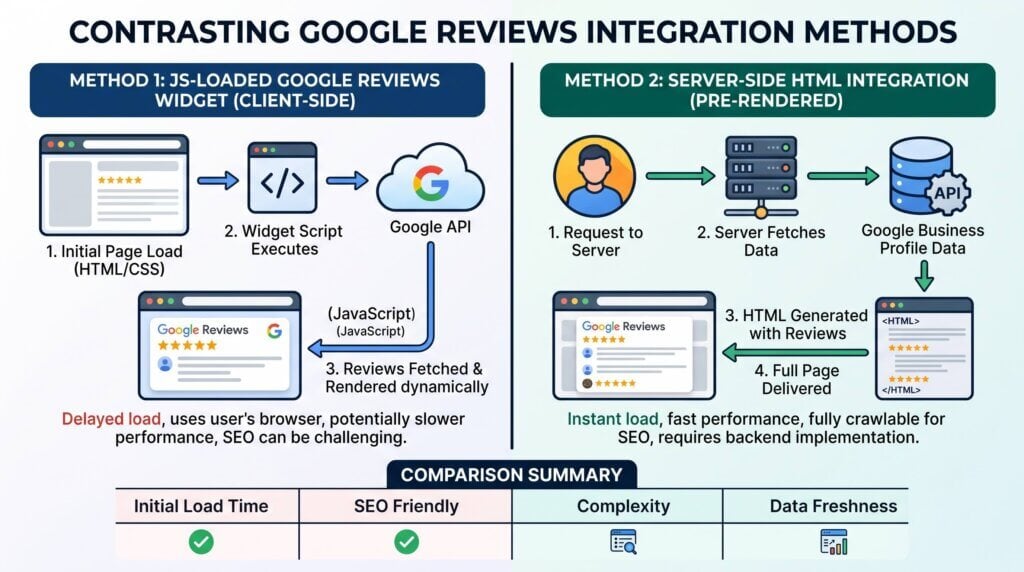
Reviews on your website can only count as content on your page when the review text is already in the HTML your server sends, which requires a server-side integration. Most review widgets load through JavaScript after the page renders, so Google credits the text to the third-party server instead of you. You still get social proof, but not really the ranking benefit.
I know reviews feel like they should be SEO gold: they’re keyword-rich, written by real patients, full of the exact phrases someone might search.
Most review widgets work like this: a plugin, something like Elfsight, EmbedSocial, Trustindex, or a “Google reviews” plugin in the WordPress repo, drops a script tag on your page. When a visitor loads the page, that script fires, calls out to a third-party server, and injects the review carousel in after the fact. The review text was never part of the HTML Google actually received when it crawled your page, so Google credits that text to wherever the script pulled it from, not to you. You get the visual, the social proof, the patient’s kind words about your bedside manner. You don’t get the SEO credit.
Here’s a fast way to check which one you’re dealing with: right-click the page and choose “View Page Source,” not “Inspect.” If the review text shows up in that raw HTML, you’re getting credit for it. If all you see is an empty widget container and a script tag, and the reviews only appear once the page finishes loading, you’re not.
Getting real credit means the review text has to already be sitting in the HTML the server sends out, before any JavaScript runs. That’s a server-side integration: pulling reviews with the Google Places API on the back end and writing them directly into the page, rather than loading them in the browser after the fact. On WordPress, that’s a pretty realistic build, and a good developer can write a custom function or plugin that fetches and caches the reviews server-side.
A few WordPress plugins that actually do this the right way:
| Plugin Name | Cost | Data Source | Output Format |
|---|---|---|---|
| Widget for Google Reviews (RichPlugins) | Free (paid tier available); 60,000+ installs | Google Places API (free tier, capped at 5 reviews); Business Profile API (paid, full archive) | HTML: saved to the WordPress database, output via shortcode or widget |
| Widget for Google Reviews (RadiusTheme) | Free | Google API, saved to the WordPress database | HTML: database-first, same approach as above |
| Site Reviews (Gemini Labs) | Free | CSV import (export from Google, no API key needed) | HTML: reviews become native WordPress content |
| Reviews Feed Pro (Smash Balloon) | Paid, from about $49/year | Google Business Profile API (up to 100 reviews) | HTML: embedded directly in the page, not an iframe |
Whichever you pick, don’t take the “SEO friendly” label on the listing page at face value. Some plugins offer both a proper HTML output and a slicker JavaScript carousel in the same package, and only one of those options is actually doing the work. When you’re choosing a layout, go with the plain grid or list view over the carousel or slider, since those are more likely to be pure HTML than JS-driven, then confirm with View Page Source before you trust it.
Let’s work on your local SEO in an SEO Sprint! Reviews are one piece of showing up locally. If you’d rather not piece the rest together on your own, my SEO Sprint is a focused stretch where we work on your local SEO together.
Why don’t the star ratings show up in my Google search results anymore?
Google stopped showing star ratings in organic results for self-reviewing businesses in September 2019. Any LocalBusiness review schema sourced from your own site, or from a widget embedded on it, is now classed as self-serving and gets no gold stars. It isn’t a penalty, so existing schema can stay, but any vendor promising to bring your stars back is selling you something that doesn’t work.
Google just stopped rewarding it, and it did so because so many businesses were faking or manipulating their numbers. If a vendor tries to sell you a plugin that promises to “get your stars back,” run away.
Can adding a review widget hurt my site?
Yes, a heavy review widget can hurt your site. Every third-party script has to download, parse, and run in the visitor’s browser, and review carousels are frequent offenders. A slow widget can push Interaction to Next Paint past Google’s 200-millisecond threshold for good responsiveness, which costs you performance and patient experience in exchange for a mostly cosmetic benefit.
Google now measures site responsiveness with that metric, and a clunky widget can tie up the browser long enough to blow past the threshold. A patient tapping a button on their phone while your widget is still loading in the background is going to notice, and it won’t reflect well on you.
I saw this with a previous client, a group dietitian practice in Tennessee. Her homepage took 7 seconds to become interactive, and a JavaScript review carousel was loading third-party scripts on top of everything else. We replaced it with a different plugin that saves her reviews to the WordPress database and outputs them as a plain grid, and we set up a simple review-request routine for her Google Business Profile. Within 2 months, her Interaction to Next Paint improved, and she moved from position 5 to position 1 in the Map Pack for her target keywords!
Do reviews matter for AI search results, like ChatGPT or Google AI Overviews?
Yes, and this is really where review effort pays off most. AI assistants recommending a local practice pull from fact-dense, specific content they can trust, and reviews full of real patient language about conditions treated and outcomes described give them that grounding. Practices with thin, generic reviews are less likely to get recommended, so volume and specificity both matter.
When someone asks an AI assistant to recommend a pediatric dietitian in their city or a pelvic floor PT near them, the model is pulling from whatever fact-dense, specific content it can find and trust. A practice with thin, generic reviews and no reputation depth is simply less likely to get recommended by a chatbot doing that kind of research on a patient’s behalf. This is one of the few places where more reviews still pays off directly, just not through the mechanism most people assume.
How do I get more Google reviews as a private practice?
Ask every patient or client, send them a direct link, and make it take under a minute. Pull your review link from your Google Business Profile and put it wherever patients already look: your follow-up email, your appointment reminder text, or a QR code at the front desk.
Ask after a visit that went well, when the patient has just thanked you or hit a goal, and make it a routine so every patient gets the link. A routine keeps reviews trickling in, which is what recency rewards. Ask everyone, not only the patients you think were happiest, because Google’s policies prohibit selectively soliciting positive reviews and a profile made entirely of fives looks suspicious anyway.
Can I offer incentives for Google reviews, or will fake reviews hurt me?
Don’t offer incentives, and don’t buy or write reviews. Google’s policies prohibit paying for reviews or offering a discount or gift in exchange for one, and Google removes reviews it flags as fake and can act against the profile behind them.
Health providers have another layer to think about. Many licensing boards and professional codes restrict how you can ask clients for testimonials, and therapists in particular should read their own board’s rules before building a review-request routine. The rules vary by profession and state, so check yours instead of assuming.
Should I respond to negative Google reviews?
Yes, reply to every review, and keep replies to negative ones short, calm, and free of patient details. Practices have a problem most businesses don’t: you can’t confirm the reviewer was a patient or discuss anything about their care, even when they described it in detail themselves. A reply that does either can create a HIPAA problem.
A safe reply thanks them, says you take feedback seriously, and moves the conversation offline:
Thank you for sharing your feedback. We take every concern seriously, and we’d like to talk with you directly. Please call our office at [phone number].
I’m not a lawyer, so have yours or your compliance contact look over your template before you use it.
Replying pays off for a few reasons. Google encourages it, though it hasn’t said replies are a ranking factor. A mix of ratings looks more believable than a wall of perfect fives, and a calm reply shows prospective patients how you handle conflict. A Harvard Business Review study of hotels found that businesses that start replying to reviews see about 12% more reviews come in afterward, so responding also helps keep the flow going.
Will Google remove an unfair negative review?
Only if the review breaks Google’s policies, which covers things like spam, fake reviews, conflicts of interest, and offensive content. You can flag the review from your Google Business Profile and wait for Google to decide, and there’s no guarantee it comes down. A harsh review from a real patient who had a bad experience stays up, and a calm reply is your best response.
Do reviews on other sites like Healthgrades or Psychology Today help?
They help patients, and they give Google more to learn about you from across the web, but your Google reviews do the most work for Map Pack ranking. Profiles on Healthgrades, Psychology Today, Yelp, and similar directories often rank for your name on their own, so they’re another place a patient meets you before seeing your website.
Google’s quality guidelines for health topics also put real weight on a provider’s reputation, and reviews spread across several sites make that reputation easier to confirm. Keep your name, address, and phone number identical everywhere so those profiles agree with each other.
So what should a private practice actually do about reviews?
Treat reviews as a Google Business Profile priority first and a website trust signal second. Keep asking for them, reply to the ones you receive, and don’t expect your website to earn SEO credit from reviews pasted onto a page.
If your web person shows you a review widget on your homepage, ask what it’s for. If the answer is “so visitors trust you faster,” that’s a fine reason to keep it. If the answer is “for SEO,” they don’t know what they’re doing.
Sources
- How Google Reviews Impact Map Pack & Organic Search Rankings, Search Engine Journal
- Making Review Rich Results More Helpful, Google Search Central
- Interaction to Next Paint (INP), web.dev
- Study: Replying to Customer Reviews Results in Better Ratings, Harvard Business Review
